
Play with xhtml and css codes
Written by Pavan Kumar on July 26, 2008
HTML is the most basic and needed markup language one should know in order to code a web page. Most of us today use free blogging softwares to create our weblogs. The free themes we use for our blogs needs a minimum coding knowledge so that we can modify it as we desire. To modify the style of a theme, we have to modify CSS file where all the styles are defined. Again it requires coding knowledge.
I too am not a coder who can design my website/ blog, but till date I used to refer w3schools to learn whatever I need to modify my blog. Today, I came up with another website where all required resources are defined and presented in a single page in a very clean manner with lively examples.
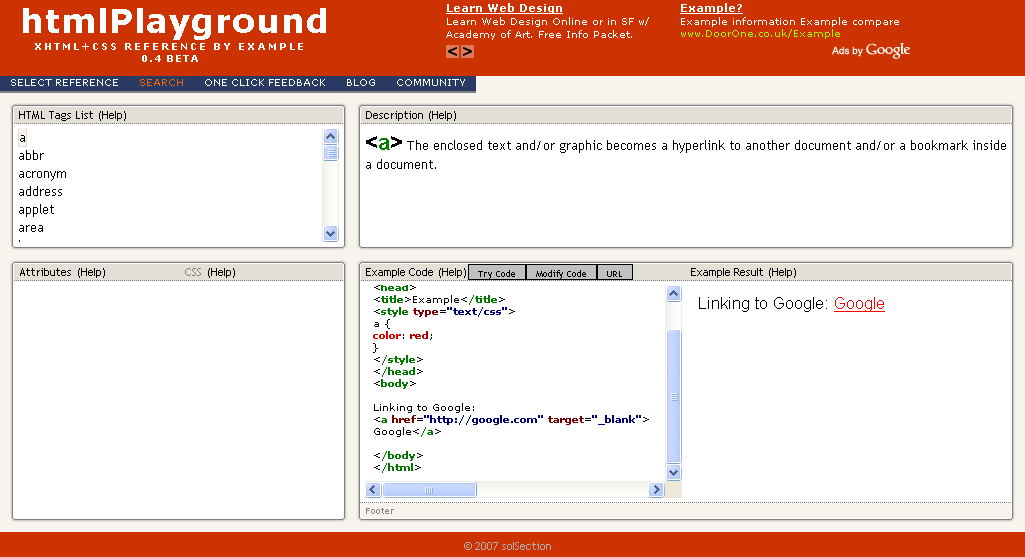
This great service is called htmlPlayground. As the name itself says, it is a playground. In the top left pane, you will find html tags listed, you may click on any tag you need to get its definition in the right pane and a live example in the bottom right corner section. You can change the first window to show reference of your choice among xhtml tags, xhtml attributes or css properties.
Even you have option for searching the part of code you needed. If you are struck with some code snippet like <a href="jfkjdsjf"> and you know what ‘a‘ stands for and want to know ‘href‘, you may just click search and enter href there.
You are also given a chance to modify the example code and experiment. Apart from that, you can load the code from an existing web page by just entering the url and edit it to see the changes in the page.
Totally, it is a good friend of a coder as all interface is provided in a single page and no need to refresh the pages again and agian saving our bandwidth.
And here is a css xhtml web development service which you may find useful if you are looking for a quality web design and development outsourcing which has served since long time.
People who liked this also read:


There is a good css tester like that located here: http://www.w3schools.com/css/default.asp. You can learn pretty much everything about styles for your site there.