
Advertisements
Few days back, I had got a comment from Fauzan on installing theme/ plugin on a wordpress blog that the one click installer plugin has been deprecated and no more support can be expected from that plugin in installing theme or plugins. This post is just to inform that we have a much better alternative which was provided during the automatic update. The new plugin which took the place of one click installer is one click plugin updater, which makes all our maintenance jobs at greater speed.

The confusion aroused due to a difference in the way these plugins work. In the older versions of one click install, we used to get the plugin/ theme installing option in the dashboard of wp-admin, where on a single page, we could install new theme or plugin also delete the same on that single page.
Now, the new plugin has enhanced features and these are the new features available.
- It searches for plugins which have latest updates available, and provides a button to upgrade all of them at once.
- The theme install feature has been moved to theme page and plugin install feature moved to plugins page of wp-admin.
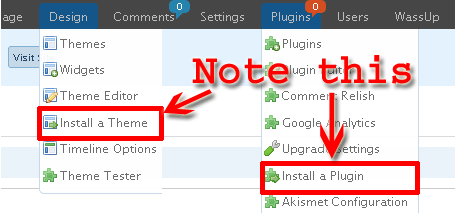
This is a must have for hyperwebenable users and most recommended for others.
You can download this plugin here if you have not used either of them.
Wonder why my wp-admin looks so fancy? It is due to admin drop down plugin.
Click here to comment
If you do not find this more useful, you may search Google using the box provided below. Google has solution for every problem:
Popularity: 11% [?]
Our Related Posts
- How to change the theme of your domain blog on Hyperwebenable
- Twitter Follower Counter Plugin For Wordpress
- Great Wordpress Plugin For Navigation in wp-admin
- How to upgrade your wordpress in hyperwebenable
- Stumble! for Wordpress - A Remarkable Plugin
- How To Install Wordpress Locally On Desktop
- Yet Another Related Posts Plugin (YARPP) Adds Related Posts In RSS Feeds
- Fix Rich Text Editor Problem in Wordpress
- Install Wordpress Locally - Video Tutorial For Dummies
- Statcounter Wordpress Integration - Best Practice
Popular Articles
- Get Orkut Scraps on your mobile phone: Part1 - India
- Make FREE calls with JAJAH : A new hack ....
- Trace anonymous phone numbers with TP2Location
- How to save copy protected images/ videos/ flash on websites
- Configure IncrediMail with GMail / Google Apps
- toktumi to get free US number | iCall to make free US or Canada Calls
- How to disable/enable shutdown in start menu
- Create custom signs/ medals/ bills/ presciptions
- Google tips? RED ALERT, never consider them!!!
- Get Orkut Scraps on your mobile phone: Part2 - World


12 Comments
This is very useful. Will save us a lot of time
@ Madhur
Surely, before this plugin, I used to update my other plugins rarely and now instantly…
For installation of plugins, themes and for any upload, there is WP-easy Uploader, very good plugin
@ Nirmal
I have never tried that before…. Let me see next time, thanks for the mention…
greatzzzzz. i will update this plugin
The thing is this is one of the best plugins I have used so far. It makes all the job a whole lot easier to install both themes and plugins. By the way, the admin drop down is really cool. Let’s see how it fits into my admin section.
Yan
@ Yan
I think there are no issues with admin drop down menu plugin and it fits for all with support. Just you may need different versions based on your wordpress version
how do u get the snap link ads over in this page above. i dont find it in my snap account. instead i get a javascript link that when placed in my site just merely opens any links in the content in a small anapshot..
@arun
Those ads are not mine, its from my free webhost hyperwebenable.
Trackback & Pingback
