
Send Personalized mails using Thunderbird
Written by Pavan Kumar on June 21, 2008
And now the time has come to learn this awesome trick as I had promised you in my previous post. I tried to experiment with different mail clients and finally found this way.

The step by step instructions provided here would help you:
1. You need to download thunderbird and install.
2. Download mailtweak extension for thunderbird. Download the extension, don’t click to install on firefox.
3. In thunderbird, goto Tools > Add-ons, click install and select the downloaded .xpi file and install it.
4. You need to restart thunderbird.
5. Again goto add-on window as above and click on mailtweak, click options.

6. In the options window, scroll down to Personalize Messages and check that.

7. You are done a part. To send personalized mail, perform following steps.
8. In thunderbird main window, goto Message > Personalize.
9. Compose your message, and fill the mail ids for which you want to mail to.
10. Click Personalize [send icon is provided, and this is used as an alternative to send option, after clicking that, your mails will be sent.]
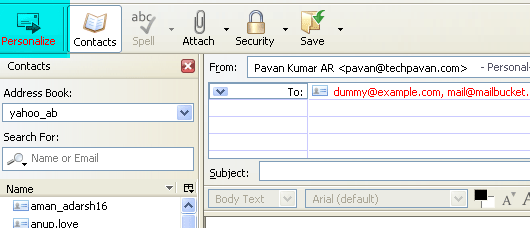
You can also include the names of the person you are addressing, just include %%[name_field]%%. For using this feature, you need to have the name included in the address book. For more details, goto the tutorial. Mailtweak has a lot of tweaks which you can learn from mailtweak site.
Note:
This method requires much time and bandwidth as a single message is splitted to individual messages which are sent seperately. For better and quick results, you need to use newsletter softwares. If you use/know any good newsletter software, please share in comments.
People who liked this also read:



You’ve a nicely done site with lots of effort and good updates. I would like to welcome you to submit your stories to http://www.surfurls.com and get that extra one way traffic to your site.