
How To Mass Add Contacts to New Sony Ericsson Mobile Phones
Written by Pavan Kumar on September 30, 2009
Its a trend to switch mobile phones, everyone tries to upgrade their phones once in two or three years. If you have bought a new mobile phone for yourself from Sony Ericsson, here is how you can add all your contacts easily without typing on tiny keypad of SE phone.
1. With backup contacts available as file
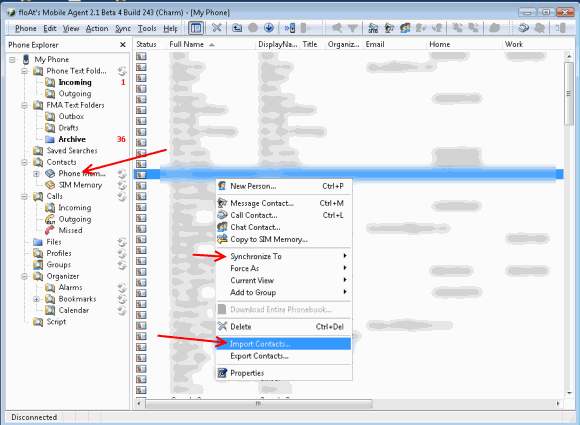
If you have a backup of contacts from previous phone / email program, you can easily insert that entire phone book into your phone. You can try SE contact backup / restore method to carry out the process. or use Float’s Mobile Agent tool and import the contacts and synchronize with phone as shown in the image below. In the course, you may need some tools like CSV to vCard Converter.
2. When contacts are not available as files
This requires some sort of work, but typing on a PC keyboard is a lot easier than typing on mobile keypad. Again use the same Float’s Mobile Agent to add contacts and don’t forget to synchronize later. In the above screenshot, the right click context menu shows you the option to add New Person. You can enter all details on that and click Synchronize To > Phone Address Book.
Also read: Testing Sony Ericsson mobile phone components, Sony Ericsson phonebook backup, Cell Phone as web camera, Second hand mobiles
People who liked this also read:


Very Useful Post…