
Youtube Blocked? Here Is The Solution!
Written by Pavan Kumar on August 30, 2008
Yesterday I experienced some problem that Youtube could not be accessed on my PC. I checked my PC and found everything right with it and no problem was found with any other sites. I googled and observed the same problem with other people of country. That probably might be some initiative taken by the top internet service provider in India, BSNL.
So, here is the quick solution I found for myself!

Use Open DNS.
Yes, change the DNS server in your internet settings. Here is the procedure to follow in steps:
1. Open Network connections [or "connect to" menu] from Windows Start button.
2. In Network connections, you will find broadband, right click on that and open properties.
3. In properties window, goto Networking tab and click Internet Protocol [TCP/IP] then properties.
4. Just change the setting of DNS Server as shown in the image below. Change the DNS Server setting to
208.67.222.222
208.67.220.220
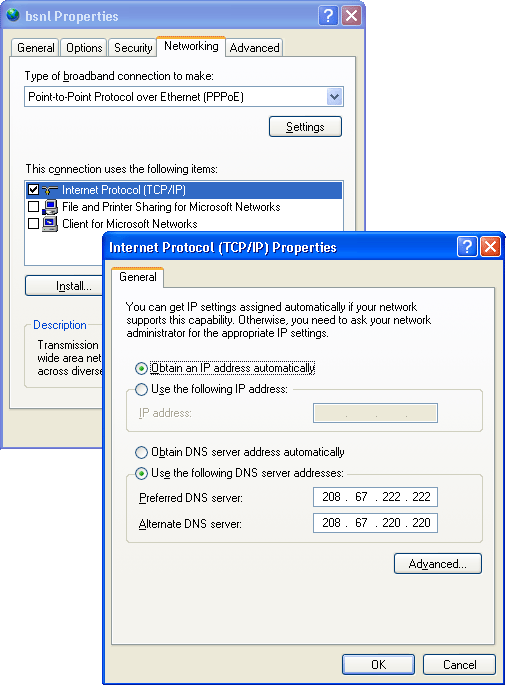
It worked for me. Hope the same helps you.
People who liked this also read:


0 Readers responded to this post
7 Blog responses for this post
Leave Your Comments Below / Trackback