
TechPavan, a technology blog
  • Home
  • About
  • Archive
  • Blog Roll
  • Contact

gTranslate: A firefox addon to translate text

Written by Pavan Kumar in Tuesday, February 19th 2008 under Uncategorized   


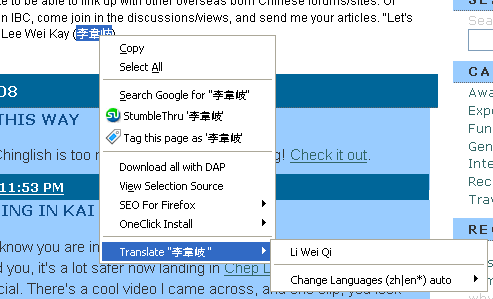
gTranslate, a firefox addon, can translate a certain part of text say some three words immediately. Just you need to select the set of words to be translated and right click on the word, and move the mouse pointer over the Translate “%text%” tab to get the translated version of the text selected. This addon uses the Google translation service for translation. Few of the popular international languages are supported.
 

gtranslate-chinese-to-english.gif

The above is a snap of a Chinese website in which an English word is written and in brackets they have written the Chinese equivalent. You can notice the translation as LI WEI QI for a standard translation given by site is LEE WEI KAY.

The translation may be done even for large context, but you need to click on the translate, which leads to the google language tools page, where anything can be translated or even a whole page can be translated.

You can install the addon from Firefox addons site here.

Popularity: 43% [?]

Share and Enjoy:
  • Digg
  • Sphinn
  • del.icio.us
  • Facebook
  • Mixx
  • Google
  • Furl
  • IndianPad
  • Live
  • Netvouz
  • Reddit
  • SphereIt
  • Spurl
  • StumbleUpon
  • Technorati
  • TwitThis
  • YahooMyWeb

Our Random Articles

  • Google tips? RED ALERT, never consider them!!!
  • Sunday Pastime #12: You can do anything
  • Get shorter synonyms with Thsrs
  • Create custom signs/ medals/ bills/ presciptions
  • Sunday Pastime #11: Its a wonderful internet

--> Read about the latest web hosting news, tips and tricks. I really enjoy reading it and you can find your best suitable hosting on mytradedomain.com

No Comment

Leave Your Comments Here

Popular Articles
  • Make FREE calls with JAJAH : A new hack ....
  • Get Orkut Scraps on your mobile phone: Part1 - India
  • Configure IncrediMail with GMail / Google Apps
  • Vakow! For sms geeks
  • Worldwide mobile e-mail to sms gateway address
  • Trace anonymous phone numbers with TP2Location
  • toktumi to get free US number | iCall to make free US or Canada Calls
  • Get Orkut Scraps on your mobile phone: Part2 - World
  • Sunday Pastime #7: Break the internet
  • Sunday Pastime #8: Some Change...
« Hacking: Its now Harvard’s turn
How to make a completely hidden folder »

Subscribes To Our Rss Feeds

Feeds Via Readers Feed

Feeds Via Email Subscriptions

Search For Post

Tag Cloud

add-on advertising annoyances ascii blog computer download drivers e-mail email entertainment firefox general google internet mobile orkut pastime photos service services side note software softwares threats tweak videos virus solutions voip web mastery windows

`
Pavan Kumar AR
web hosting and domain registration
Tips, tricks, tweaks
Technology news
`
  • Your Ad Here
    -->
  • Add to Technorati Favorites

Most Comments

  • Get a free domain name by cheating a top blogger! (33)
  • Google updates Page Rank (20)
  • Rename multiple files in windows (18)
  • Configure IncrediMail with GMail / Google Apps (17)
  • Sunday Pastime #8: Some Change... (16)
  • How to change the theme of your domain blog on Hyperwebenable (12)
  • Solving different virus/malware attacks (12)
  • Vakow! For sms geeks (12)
  • Get Orkut Scraps on your mobile phone: Part1 - India (11)
  • Alexa first update of traffic rank after changing  (11)
  • Recent Posts

    • Google tips? RED ALERT, never consider them!!!
    • Sunday Pastime #12: You can do anything
    • Get shorter synonyms with Thsrs
    • Create custom signs/ medals/ bills/ presciptions
    • Sunday Pastime #11: Its a wonderful internet
    • Get a free domain name by cheating a top blogger!
    • Backup your drivers with Driver Genius
    • Sunday Pastime #10: The power of music
    • Rename multiple files in windows
    • Convert your image to ASCII
  • Recommended

    Privacy Policy
    Dallas SEO Services
    Busby SEO Challenge
    Ring Tones
    Craigs List
©2008 TechPavan.com
