TechPavan, a technology blog
  • Home
  • About
  • Archive
  • Blog Roll
  • Contact

Learn to use Norton Ghost 2003

Written by Pavan Kumar in Saturday, February 16th 2008 under software   


In one of my previous posts, I had promised all my users that I will give a detailed lesson on using the Norton Ghost 2003. Now the time has come to share with you my knowledge of Norton Ghost 2003.


Why I prefer Norton Ghost 2003?


Many advancements have been made and many recent versions of Norton Ghost are available on the internet. But still, I prefer this old version as this utilizes your system resources to the fullest extent. Also that, the usage is very easy and a very handy executable file of less than 1MB is enough to keep your system easy recoverable.

Here are the step by step information on the usage of this super tool:

1. Keep the ghost executable file on your dos bootable cd or any fat 32 partition - MS DOS do not support NTFS file system. Turn your system on with DOS - the one which could be found while installing Windows 98/Me. You may use bootable disks for dos.

2. Navigate into the directory where you have placed the ghost.exe file and type ghost and hit enter.

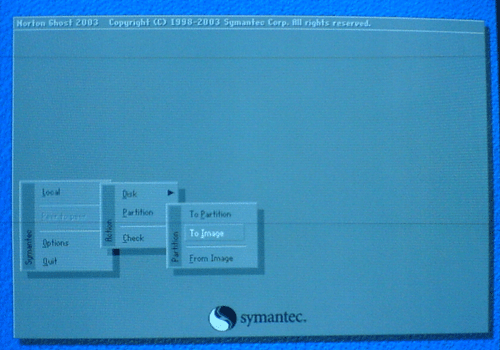
3. You will get a welcome screen, just hit enter. After a welcome screen, you will get a screen like this where you have to select the type of task to be done. The main tasks available are:


  • Disk to disk copy
  • Disk to image copy
  • Image to disk copy
  • Partition to partition copy
  • Partition to image
  • Image to partition


ghost-1.gif


4. Select the hard disk which is the source of your data. In this image, you can notice only one hard disk which has been installed on my system. If you have multiple harddisks, you need to select carefully. Based on the operation you have selected in the step 3, further screens may differ.
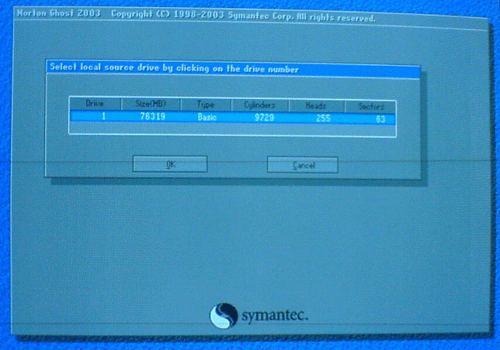
 

ghost-2.gif


5. The following are the images for backing up a partition. Select the partition you need to backup, I have chosen C drive for this purpose.
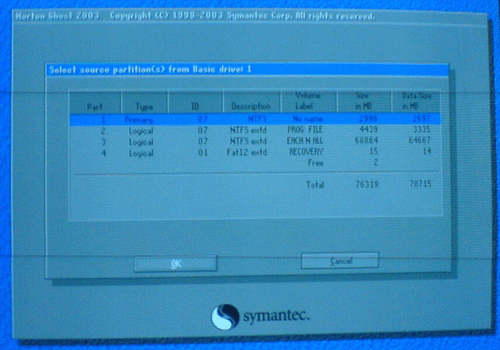
 

ghost-3.gif


6. Select the destination to store the image file. The destination should be a non source partition. Provide a file name, a description if needed and save.
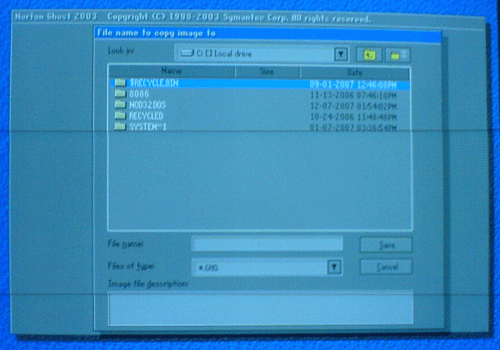
 

ghost-4.gif


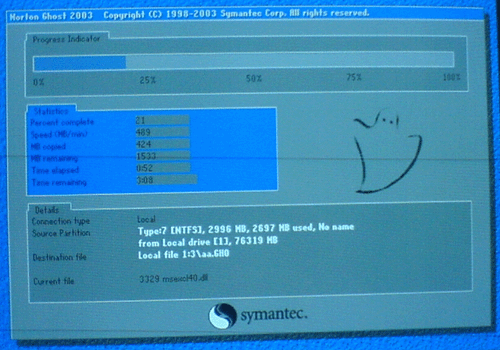
7. You will be prompted to use compression, you may choose as it saves your disk space and also its safe. You will be presented with a progress screen like this and all the job is over after this. The total process hardly takes some 5 minutes for a partition with 3GB of data on a 80 GB hard disk with 256MB of RAM. The performance may vary for different systems.
 

ghost-5.gif


8. Use similar steps to restore a partition from an image. Very simple steps are involved in the whole process and it is recommended that you backup your OS drive as it has the maximum chances of corruption.

Note: Throughout the process, you will not be having mouse support. Use Tab, Enter, Arrow keys for operations and keyboard works normally.

You may download the ghost software here.

Popularity: 29% [?]

Share and Enjoy:
  • Digg
  • Sphinn
  • del.icio.us
  • Facebook
  • Mixx
  • Google
  • Furl
  • IndianPad
  • Live
  • Netvouz
  • Reddit
  • SphereIt
  • Spurl
  • StumbleUpon
  • Technorati
  • TwitThis
  • YahooMyWeb

You may also be interested in:

  1. toktumi to get free US number | iCall to make free US or Canada Calls

Our Random Articles

  • Google tips? RED ALERT, never consider them!!!
  • Sunday Pastime #12: You can do anything
  • Get shorter synonyms with Thsrs
  • Create custom signs/ medals/ bills/ presciptions
  • Sunday Pastime #11: Its a wonderful internet

--> Read about the latest web hosting news, tips and tricks. I really enjoy reading it and you can find your best suitable hosting on mytradedomain.com

2 Comments

MyAvatars 0.2
Waleed from EGYPT Said in Monday, February 25th, 2008 @7:01 pm  

thank you !

Trackback & Pingback

  1. Combat multiple virus problems | TechPavan.com mentioned about this post in Saturday, February 16th, 2008 @2:41 pm  
Leave Your Comments Here

Popular Articles
  • Make FREE calls with JAJAH : A new hack ....
  • Get Orkut Scraps on your mobile phone: Part1 - India
  • Configure IncrediMail with GMail / Google Apps
  • Vakow! For sms geeks
  • Worldwide mobile e-mail to sms gateway address
  • Trace anonymous phone numbers with TP2Location
  • toktumi to get free US number | iCall to make free US or Canada Calls
  • Get Orkut Scraps on your mobile phone: Part2 - World
  • Sunday Pastime #7: Break the internet
  • Sunday Pastime #8: Some Change...
« Happy Valentine’s day:::
Combat multiple virus problems »

Subscribes To Our Rss Feeds

Feeds Via Readers Feed

Feeds Via Email Subscriptions

Search For Post

Tag Cloud

add-on advertising annoyances ascii blog computer download drivers e-mail email entertainment firefox general google internet mobile orkut pastime photos service services side note software softwares threats tweak videos virus solutions voip web mastery windows

`
Technology news
Pavan Kumar AR
web hosting and domain registration
Tips, tricks, tweaks
`
  • Your Ad Here
    -->
  • Add to Technorati Favorites

Most Comments

  • Get a free domain name by cheating a top blogger! (33)
  • Google updates Page Rank (20)
  • Rename multiple files in windows (18)
  • Configure IncrediMail with GMail / Google Apps (17)
  • Sunday Pastime #8: Some Change... (16)
  • How to change the theme of your domain blog on Hyperwebenable (12)
  • Solving different virus/malware attacks (12)
  • Vakow! For sms geeks (12)
  • Get Orkut Scraps on your mobile phone: Part1 - India (11)
  • Alexa first update of traffic rank after changing  (11)
  • Recent Posts

    • Google tips? RED ALERT, never consider them!!!
    • Sunday Pastime #12: You can do anything
    • Get shorter synonyms with Thsrs
    • Create custom signs/ medals/ bills/ presciptions
    • Sunday Pastime #11: Its a wonderful internet
    • Get a free domain name by cheating a top blogger!
    • Backup your drivers with Driver Genius
    • Sunday Pastime #10: The power of music
    • Rename multiple files in windows
    • Convert your image to ASCII
  • Recommended

    Privacy Policy
    Dallas SEO Services
    Busby SEO Challenge
    Ring Tones
    Craigs List
©2008 TechPavan.com