
Characterize your characters :-)
Written by Pavan Kumar on February 13, 2008
I remember, someone asked me on orkut how I make use of different characters apart from the standard English alphabets and numbers. Though it is a very old trick, many people are not aware of it even today. I have never asked any blogger/expert orkuttian how to use different characters on our profile. I just recollected from my memory the usage of symbols in Microsoft Word, or the method I used to see how different fonts look on different softwares.

The trick I am going to share here is a very simple one, I hope you do not forget this trick as long as you use Windows XP.
Navigate yourself in xp to the program indexed here:
Start>Programs>Accessories>System tools>Character Map or alternately you can do this: Start>Run>charmap>[ok]
You will get a screen as shown below.
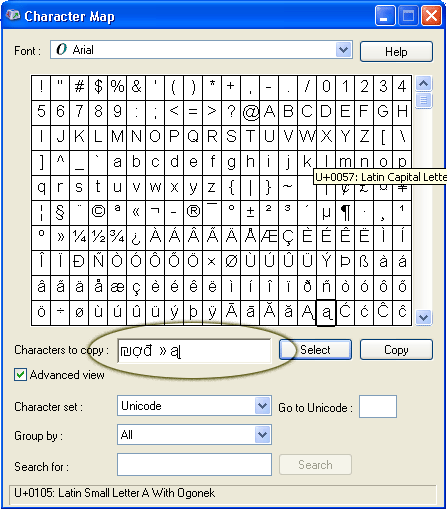
Here you can change the font, character set in the font. When the font you were looking for is found, just double click it or click it and click select. When all the fonts are selected and placed on the characters to copy tab, click copy and paste it wherever you need.
People who liked this also read:


0 Readers responded to this post
2 Blog responses for this post
Leave Your Comments Below / Trackback